The 90-90-90 Rule: Fixing Your Desk Setup in 5 Minutes
How to coordinate chair heights, angles, and monitor setups to stabilize your spine.
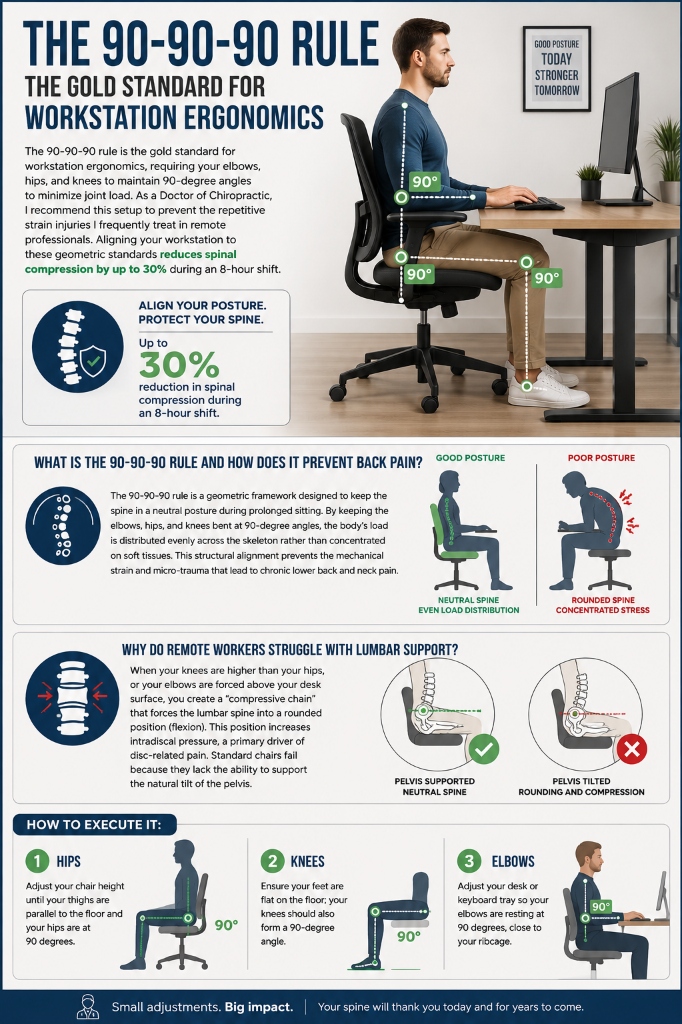
The 90-90-90 rule is the gold standard for workstation ergonomics, requiring your elbows, hips, and knees to maintain 90-degree angles to minimize joint load. As a Doctor of Chiropractic, I recommend this setup to prevent the repetitive strain injuries I frequently treat in remote professionals. Aligning your workstation to these geometric standards reduces spinal compression by up to 30% during an 8-hour shift.
What is the 90-90-90 rule and how does it prevent back pain?
The 90-90-90 rule is a geometric framework designed to keep the spine in a neutral posture during prolonged sitting. By keeping the elbows, hips, and knees bent at 90-degree angles, the body's load is distributed evenly across the skeleton rather than concentrated on soft tissues. This structural alignment prevents the mechanical strain and micro-trauma that lead to chronic lower back and neck pain.
Why do remote workers struggle with lumbar support?
When your knees are higher than your hips, or your elbows are forced above your desk surface, you create a "compressive chain" that forces the lumbar spine into a rounded position (flexion). This position increases intradiscal pressure, a primary driver of disc-related pain. Standard chairs fail because they lack the ability to support the natural tilt of the pelvis.
How to execute it:
- Hips: Adjust your chair height until your thighs are parallel to the floor and your hips are at 90 degrees.
- Knees: Ensure your feet are flat on the floor; your knees should also form a 90-degree angle.
- Elbows: Adjust your desk or keyboard tray so your elbows are resting at 90 degrees, close to your ribcage.
Living the nomad life in Panama? Check out my Hidden Gems Panama Guide for more on integrating health and relocation.
Dr. Chris Bowe, DC
Doctor of Chiropractic & Founder of DeskReliefNow
Dr. Chris Bowe, DC is a licensed Doctor of Chiropractic and the founder of DeskReliefNow and HiddenGemsPanama. With over 15 years of clinical experience, he specializes in treating musculoskeletal conditions related to sedentary work environments. An expat resident in Panama since 2025, Dr. Bowe leverages his dual background in clinical biomechanics and international relocation to provide unique, evidence-based guidance for digital nomads and professionals living abroad.
Frequently Asked Questions
Why does my lower back hurt after sitting at a desk all day?
Lower back pain after sitting usually comes from staying in one static position for too long—not just from a bad chair. Prolonged stillness, unsupported feet, a low monitor, and gradual slumping shift extra load onto your lumbar spine. Regular movement breaks and a balanced workstation setup help interrupt that pattern.
How should I set up my chair and desk to reduce lower back pain?
Arrange your workstation as a single system rather than separate pieces. Keep both feet flat on the floor or a footrest, slide your hips back against gentle lumbar support, pull your keyboard and mouse close so your elbows stay near your sides, and place the top third of your monitor near eye level.
How often should I take movement breaks during the workday?
Short, frequent breaks work better than waiting until your back feels stiff. Both OSHA and NIOSH recommend varying tasks and changing positions throughout the day. Stand during phone calls, walk to refill your water, or take a two- to five-minute walking reset between meetings to let your muscles recover.
When should I see a doctor for lower back pain from sitting?
Consult a qualified healthcare professional if your lower back pain is severe, persistent, worsening, or follows an injury. Prompt medical evaluation is also important if discomfort is paired with pain traveling down the leg, numbness, tingling, new weakness, loss of balance, fever, night pain, or bladder or bowel changes.
Remote Ergonomics Cluster
Topical Authority Roadmap